Guides › New tab productivity
9 ways to turn your new tab into a command center
The average person opens a new browser tab dozens of times a day. That's dozens of tiny moments staring at an empty search box. Here's how to reclaim them.
1. Put your real destinations one click away
Most people type the same 8–10 URLs over and over. Replace the blank tab with a grid of your actual daily destinations — email, calendar, work tools, the sites you always end up on — and you skip the typing entirely.
2. Separate "work" from "everything else"
Group your shortcuts into zones — a work zone and a personal/fun zone — so the tools for the task in front of you are together. It sounds small, but visual grouping reduces the friction of context-switching.
3. Bring the information you check anyway to you
If you open the news and glance at the markets every morning, put a headlines strip and a markets ticker on the page you already open. You get the update without the detour — and without falling into a feed.
Dayblaster’s news ticker fetches headlines from Google News RSS. The markets ticker in the product code includes S&P 500, NASDAQ Composite, Dow Jones, Nikkei 225, FTSE 100, CAC 40, DAX, SSE Composite, and Euronext 100, plus a local index by country and currency rates. Those bars are present on first open. You do not add a news widget or a stock widget to an empty board. See product facts.
4. Keep a visible to-do list
A three-item list you actually see every time you open a tab beats a polished task app you forget to open. Put the day's top tasks where you can't miss them.
5. Use widgets instead of extra tabs
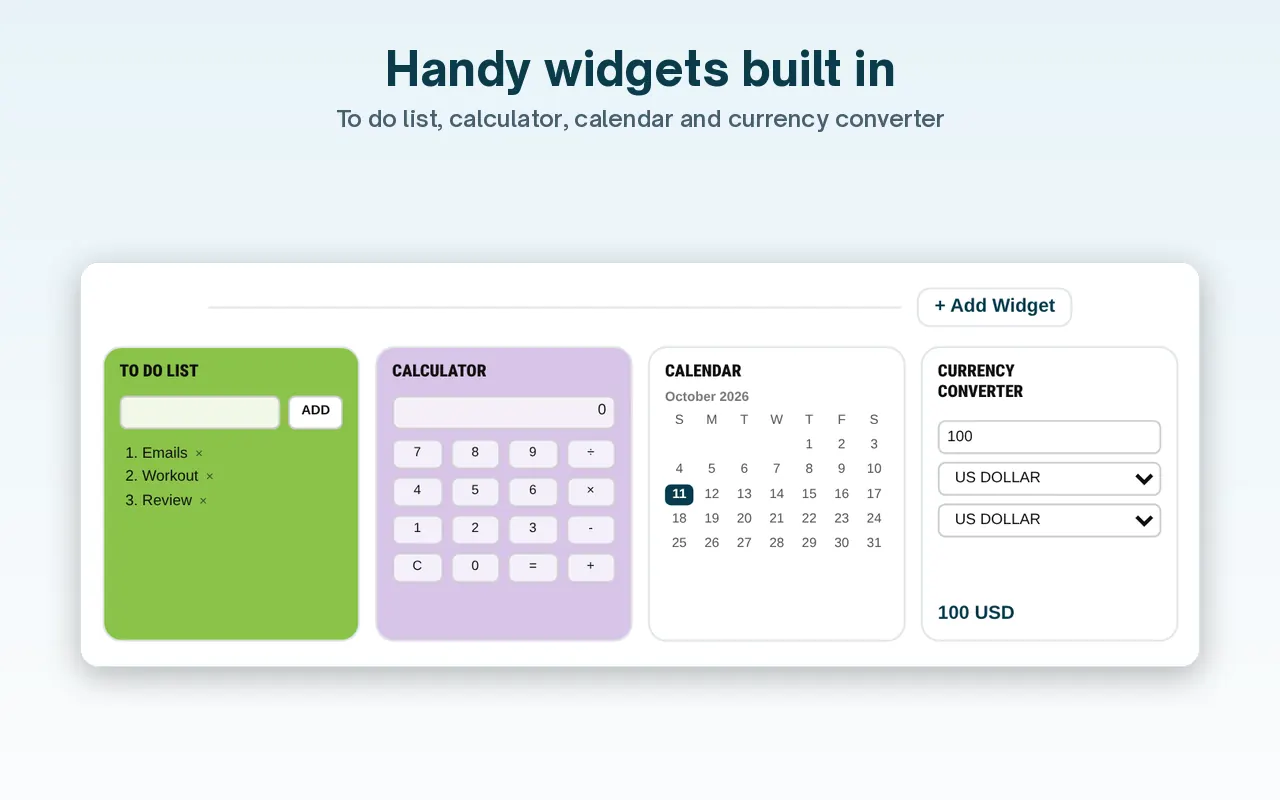
A calculator, a calendar, a currency converter, a timer — you probably open a whole tab (or your phone) for each. Small widgets on your start page handle these micro-tasks in place.
The product lists these addable widgets: Notes, To Do List, Calculator, Calendar, Currency Converter, Clock, Weather, Timer, Alarm, Countdown, Pomodoro, and Custom Text. The free plan allows up to 7 widgets in the dock. Pro allows up to 14. Weather and clock can follow a chosen or detected location. The Calendar widget shows the current month. For converting a date across Gregorian, Hebrew, Islamic, or other calendar systems, use the multi-calendar date converter on Whatistheday.
6. Try a focus timer (Pomodoro)
A 25-minute focus / 5-minute break cycle is the simplest productivity system that works. Having the timer on your start page means it's always one click from a focused sprint.
7. Cut the visual noise
A calm background and a clean layout matter more than they seem — your start page sets the tone for the tab. Pick a background that's easy on the eyes and doesn't compete with your content.
Dayblaster backgrounds listed on the facts page are White, Black, Light blue, Pink, Orange, Velvet, and Green, plus an uploaded image. Pro scene backgrounds are Deep Ocean, Starry Night, Twilight Clouds, and Aurora. Pro also adds page profiles named Personal, Work, and Chill.
8. Make it the same on every device
The setup only becomes a habit if it follows you. Choose a start page that syncs, so your laptop, home computer and work machine all open the same command center.
9. Set it as your actual new tab
None of this helps if you have to navigate to it. The payoff comes when it is your new tab — opening automatically every time. In Chrome and Edge that takes a small extension; see our homepage & new-tab guide.
Chrome Help, “Set your homepage and startup page,” is the official path for the Home button and for On startup. Chrome Help, “Customize your New Tab page in Chrome,” covers the built-in tile row. It does not document a custom New Tab URL. Microsoft Support, “Change your browser home page,” covers Edge, and also restates Chrome, Firefox, and Safari. Apple Support, “Change your homepage in Safari on Mac,” lets new windows and new tabs open with Homepage. Mozilla’s home-page article lets Homepage and new windows use a custom URL. Mozilla’s New Tab help does not give a custom website field for every new tab.
Shortcut zones on Dayblaster are My Work Zone, My Fun Zone, AI Tools, and a Google apps row. Shortcuts can be added, edited, deleted, and dragged to reorder. Optional setup kits import a ready-made layout: Developer, Creator, Student, Trader. Without an account, settings stay in the browser. An optional free account backs up and syncs them. Signed-in users can restore the last 30 saved versions. Anyone can download a local backup file. See add shortcuts and recover a lost dashboard.
Official sources
- Dayblaster product facts (this site: zones, news, markets, widgets, backgrounds, sync)
- Set your homepage and startup page (Google Chrome Help, checked October 2026)
- Customize your New Tab page in Chrome (Google Chrome Help, checked October 2026)
- Change your browser home page (Microsoft Support, checked October 2026)
- How to set the home page (Firefox Help, checked October 2026)
- Change your homepage in Safari on Mac (Apple Support, checked October 2026)
More guides: Set your homepage in every browser · Best free AI tools 2026 · Best start pages 2026 · All guides · About · Contact · Terms · Chrome Web Store · Cookie settings