Guides › AI Tools zone
How to set up the AI Tools zone in Dayblaster
The AI Tools row on Dayblaster is a shortcut zone, not a ranking of AI products. This page lists the defaults the product code actually ships, then shows how to add, edit, remove, or replace them.
Open https://www.dayblaster.com/. Below the Work and Fun zones is a heading labeled AI TOOLS. Each tile is a shortcut with a name and a URL. Clicking a tile opens that site in the usual way. Dayblaster does not run the AI models. It only stores the links.
Default AI shortcuts in the product
The default list lives in the page script as aiDefaults. On a fresh page, or after a reset
of that zone, these eleven shortcuts appear:
| Name shown | URL stored in the default |
|---|---|
| ChatGPT | https://chatgpt.com |
| Claude | https://claude.ai |
| Perplexity | https://www.perplexity.ai |
| Gemini | https://gemini.google.com |
| Copilot | https://copilot.microsoft.com |
| Midjourney | https://www.midjourney.com |
| Manus | https://manus.im |
| Grok | https://grok.com |
| Suno | https://suno.com |
| DeepSeek | https://chat.deepseek.com |
| Higgsfield | https://higgsfield.ai |
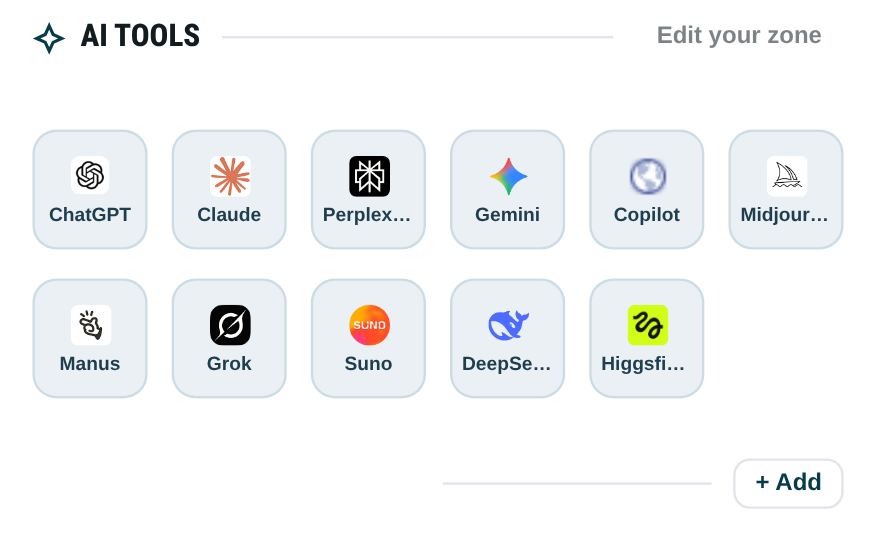
That list is a starting set, not a review. This page does not rank the tools or invent usage stats. If a site changes its URL, edit the shortcut. The zone does not update remote product pages for you.
Step by step: set up the zone
These steps match the current homepage script. No account is required to try them. Open https://www.dayblaster.com/, then scroll past My Work Zone and My Fun Zone to the heading labeled AI TOOLS.
- Click + Add at the foot of the AI Tools zone. The dialog title is ADD SITE. The page script also treats Edit your zone as an add control, so that button opens the same dialog for this zone.
- Enter a site name and a URL. If you omit
https://, the script prefixes it. You can leave Icon URL blank. When the icon field is empty, the script stores a Google favicon for that site’s domain. - Set Section to AI TOOLS if the dialog was opened from another zone. The other choices are Google apps, Left MY WORK ZONE, and Right MY FUN ZONE.
- Click Save. The tile is appended to the AI Tools row. A short toast says Shortcut saved.
Clicking a tile opens that URL in a new browser tab. Dayblaster stores the name, URL, icon, and section. It does not sign you into the other site and it does not run that site’s model.
Edit, remove, and reorder tiles
Edit a tile
Hover a tile, or move keyboard focus onto it. The edit control (pencil) and the delete control (×) appear at the top right. Click the pencil. The dialog title changes to EDIT SITE. You can change the name, URL, icon, or section, then Save. The toast says Shortcut updated.
Remove a tile
Hover or focus the tile and click ×. The script asks, “Are you sure you want to delete this link?” Confirm to remove it. The toast says Shortcut deleted. There is no undo in that dialog. Use a backup file or, if you are signed in, Restore an earlier version, if you want the tile back.
Reorder tiles
AI Tools tiles are draggable. The hover title on a tile is Drag to reorder. Drag a tile to a new spot inside the AI Tools row and drop it. The toast says Shortcut order saved. Drag stays inside that row. You cannot drop an AI Tools tile onto Work, Fun, or the Google row. To move a tool to another zone, edit it and change Section.
The in-app help widget repeats add, edit, remove, and drag for every zone. The order and the tiles
are stored with the rest of the shortcuts in this browser as dashboard.shortcuts.v2.
How setup kits change the AI row
Importing a setup kit replaces shortcuts, including the AI Tools zone. A
?kit= link asks you to confirm first. The kit files do not keep the full default list.
After confirm, the current shortcuts are snapshotted, then the kit list is written. Widgets, tasks,
and background stay. This is what each kit file writes into AI Tools:
- Developer (
?kit=developer): ChatGPT (https://chatgpt.com), Claude (https://claude.ai), Copilot (https://github.com/features/copilot), Perplexity (https://www.perplexity.ai), v0 (https://v0.dev) - Content Creator (
?kit=creator): ChatGPT, Claude, Descript (https://www.descript.com), ElevenLabs (https://elevenlabs.io) - Student (
?kit=student): ChatGPT, Claude, Perplexity - Trader (
?kit=trader): ChatGPT, Perplexity
After a kit import you can add any default tile back by using + Add and the URL from the table above. The Developer kit’s Copilot tile points at GitHub’s Copilot page, not at https://copilot.microsoft.com, which is the default Copilot URL on a fresh page.
Back up the layout
Open settings (the background panel). Click Download backup. The file name is
dayblaster-backup.json. That file includes the shortcut list, so the AI Tools row is in
it, plus widgets, background, location, tasks, and profiles when those keys exist. The file is marked
as a Dayblaster backup. Restore backup in the same panel reads that file and reloads the page. A file
that is not a Dayblaster backup is rejected.
Signed-out edits stay in this browser until you download a file or create an account. A free account stores a copy of your page settings so they can sync. Signed-in users can also open the account menu and use Restore an earlier version. The product facts page states that the last 30 saved versions are kept. A full restore walkthrough is on recover a lost dashboard.
If you use Dayblaster in a second browser, download a backup there before you sign in if you want to keep that local copy. Clearing this browser’s site data deletes a signed-out layout that was never backed up or synced.
Privacy notes for this zone
The privacy policy is the source for these points. Without an account, shortcuts, widgets, background, and preferences stay in this browser (localStorage) and are not sent to Dayblaster servers. Clearing browser data deletes them. With a free account, Dayblaster stores your email and a copy of your page settings, including shortcuts, so they can sync. That copy lives on Supabase infrastructure in the European Union (Frankfurt). Sign-in uses an email link. Dayblaster does not store a password.
Tile icons use Google’s favicon service. Clicking a tile sends you to that third-party site, which has its own account and privacy rules. Dayblaster does not run the models behind those sites. Free-tier pages may show ads from third-party vendors, including Google. Advertising and analytics storage stay denied until you accept cookies. You can change that choice with Cookie settings in the footer. Google’s Ads Settings and My Ad Center describe how to opt out of personalized ads. The optional Chrome extension only opens dayblaster.com as the new tab and does not collect data of its own.
Keep the zone useful
A short zone is easier to scan than a long one. Keep the tools you open most days. Remove tiles you never click. If you use one assistant for writing and one for search, two or three shortcuts are enough. The product does not require all eleven defaults.
The AI Tools zone is one of four shortcut sections. Work, Fun, and the Google apps row work the same way. Help inside the app repeats the add, edit, and drag steps for every zone.
Official sources for the default and kit URLs
Third-party names below come from the official site for that URL, checked 12 October 2026. This page does not rank the tools, quote user counts, or invent plans. Perplexity and DeepSeek are listed only as stored URLs because those live pages did not return readable copy during the check.
- ChatGPT (chatgpt.com; official title Chat, Work, Create and Code with AI)
- Claude (claude.ai)
- Perplexity (www.perplexity.ai; URL as stored)
- Google Gemini (gemini.google.com)
- Microsoft Copilot (copilot.microsoft.com; official page: chat to find answers, create content, and complete tasks)
- Midjourney (midjourney.com; official About: a community-funded research lab that builds AI image and video models)
- Manus (manus.im; official title Manus: Hands On AI)
- Grok (grok.com)
- Suno (suno.com; official title AI Music Generator)
- DeepSeek (chat.deepseek.com; URL as stored)
- Higgsfield (higgsfield.ai; official site: AI video and image generation platform)
- GitHub Copilot (github.com/features/copilot; Developer kit only)
- v0 (v0.dev; Developer kit only)
- Descript (www.descript.com; Content Creator kit only)
- ElevenLabs (elevenlabs.io; Content Creator kit only)
- Dayblaster privacy policy and product facts (this site)
More guides: Setup kits · Add shortcuts to a new tab · All guides · About · Contact · Terms · Chrome Web Store · Cookie settings