How to make Google my homepage or change it
To make Google your homepage, or to change or replace it, open your browser settings and set the homepage
(and, if you want, the startup page) to https://www.google.com or any other address.
To use the Dayblaster start page instead, set the same fields to
https://www.dayblaster.com. Comparisons:
Dayblaster vs Momentum and
Dayblaster vs start.me.
Homepage, startup page, and new tab are not the same
Browsers keep these as separate settings. Changing one does not automatically change the others.
- Homepage: the page that opens when you select the Home button.
- Startup page: the page or pages that open when you first launch the browser.
- New tab page: the page that appears when you open a new tab.
Chrome's own help says the homepage and startup page are not the same unless you set them to be. You can set a homepage on a computer or on Android. Chrome on iPhone and iPad does not offer that homepage setting.
Chrome and Edge let you customize the look of the built-in new tab page (shortcuts, theme, layout). Those settings do not let you type a custom website for every new tab. A custom new-tab URL in Chrome needs an extension that overrides the New Tab page. Firefox settings let you pick Firefox Home or a blank page for new tabs, not a custom URL. Safari on Mac can open new windows and new tabs with your homepage, with no extension.
Chrome
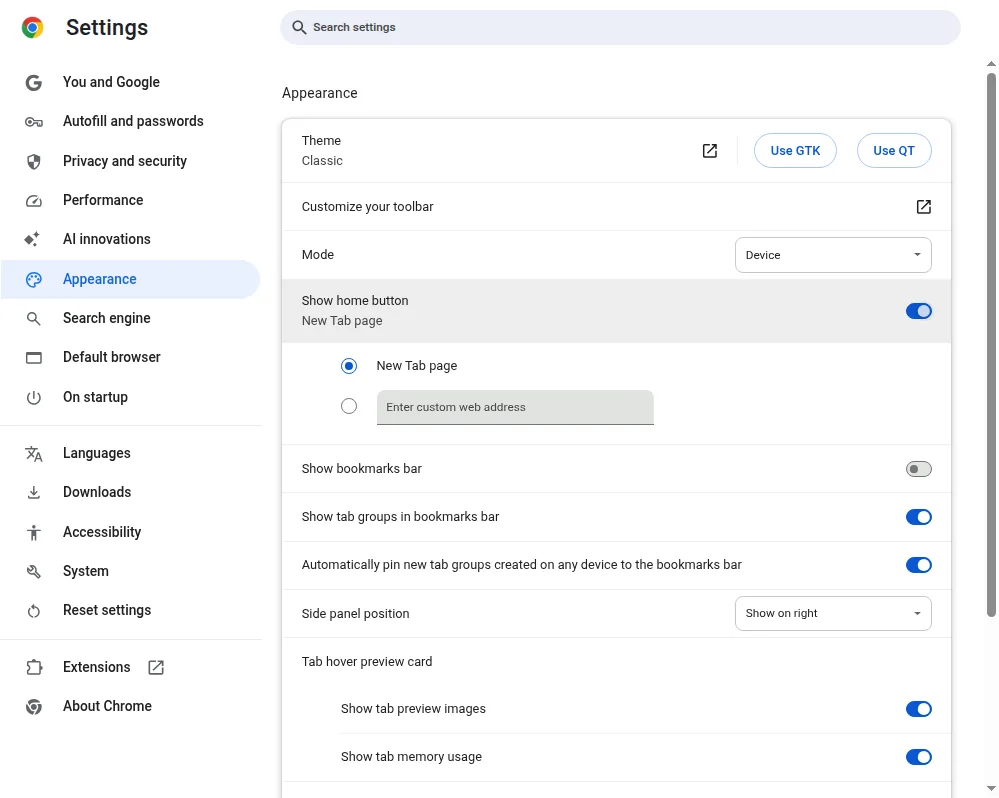
- Open Chrome. At the top right, select More, then Settings.
- Under Appearance, turn on Show Home button.
-
Under Show Home button, choose the New Tab page or a custom page. To make Google your
homepage, enter
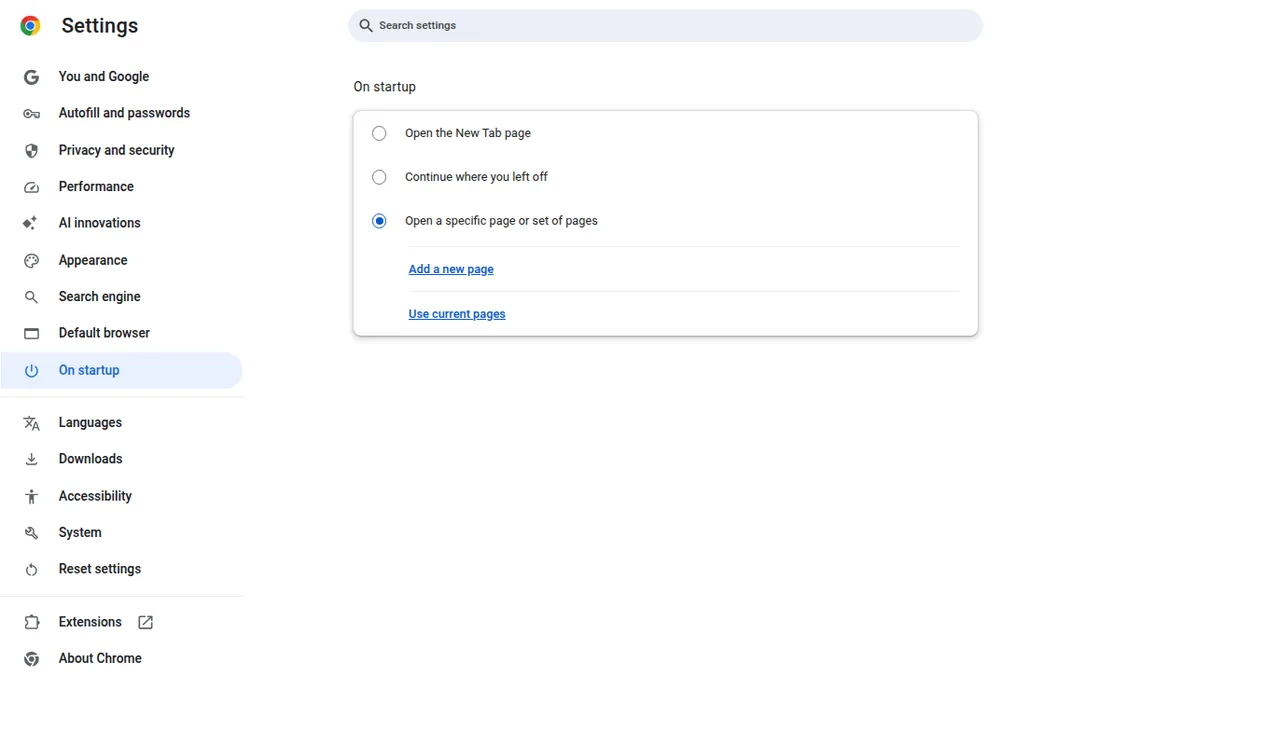
https://www.google.com. To replace it, enter another address such ashttps://www.dayblaster.com. - Open On startup and select Open a specific page or set of pages.
- Select Add a new page, enter the same address, then select Add.
On a work or school Chromebook, an administrator can lock the homepage and startup page so you cannot change them.
Microsoft Edge
- Open Microsoft Edge and select Settings and more, then Settings.
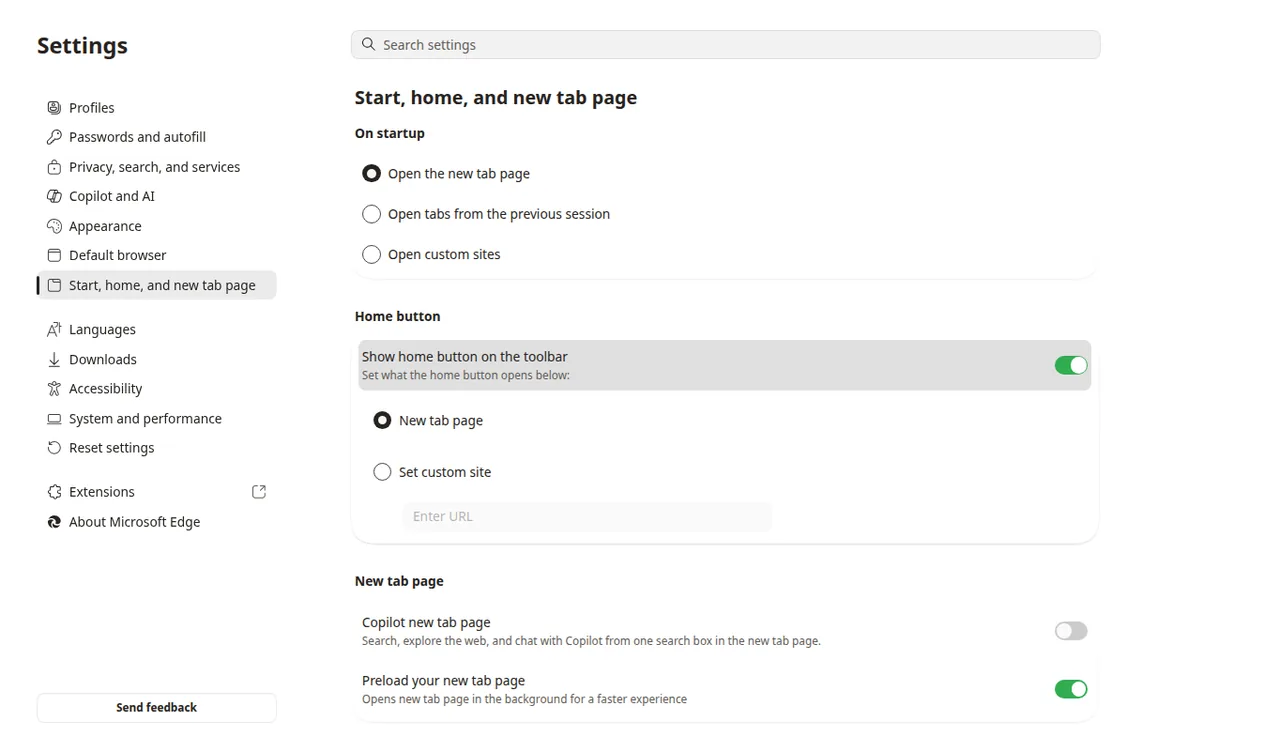
- Select Start, home, and new tab page. Some Edge versions label this Start, home, and new tabs.
- Turn on Show home button on the toolbar.
-
Choose New tab page, or select Enter URL and type
https://www.google.comor another address. - On the same page, choose what opens when you start the browser. To open a specific site, choose Open these pages and add the address.
Firefox
- Open Firefox and select the menu button (three lines), then Settings.
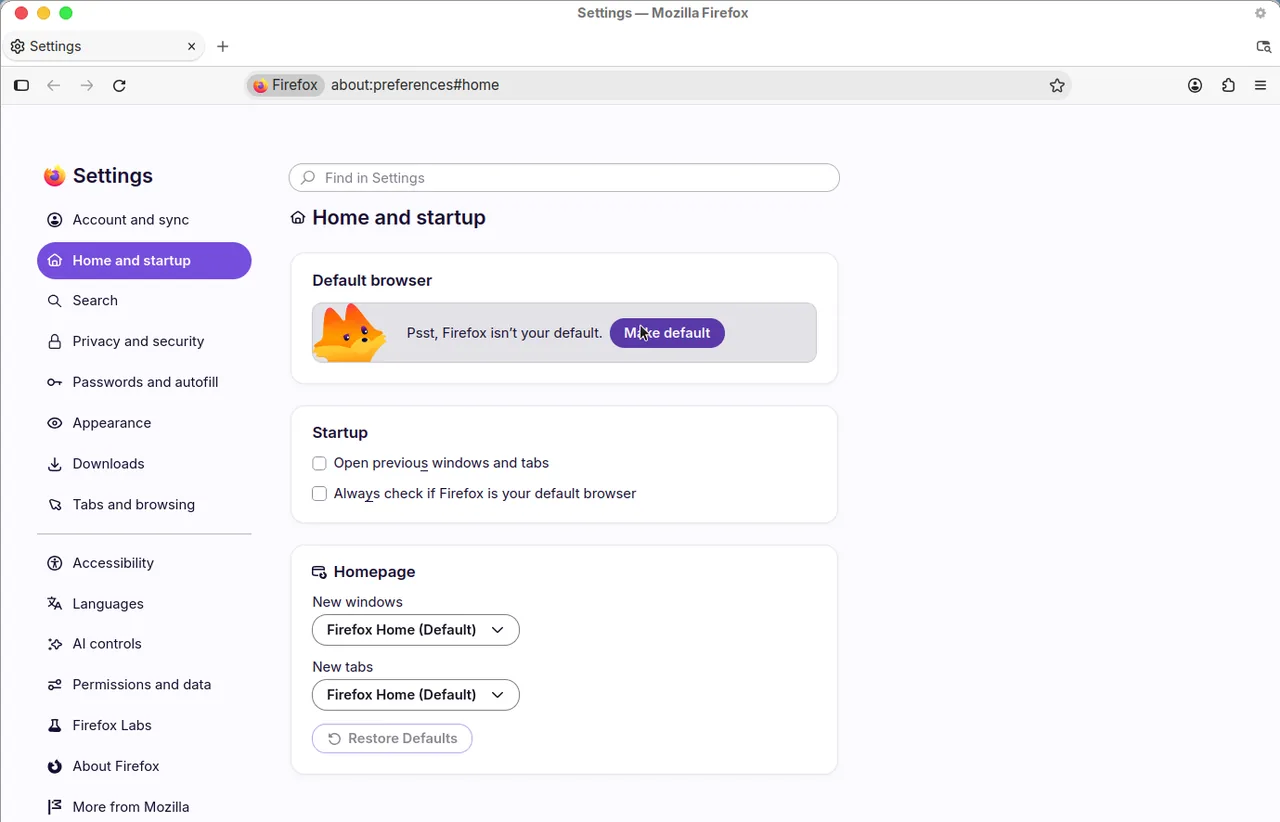
- Open the Home panel. Some Firefox versions label this Home and startup.
- Next to Homepage and new windows, open the menu.
-
Choose Custom URLs and enter
https://www.google.comor another address. You can also choose Firefox Home (Default) or Blank page.
Firefox can add a Home button to the toolbar when you set a custom homepage. The Home setting covers new windows. It does not, by itself, put a custom website on every new tab.
Safari (Mac)
- Go to the Safari app on your Mac.
- Choose Safari > Settings, then click General.
-
In the Homepage field, enter
https://www.google.comor another address. You can also click Set to Current Page. - To show that page in new windows, set New windows open with to Homepage.
- To show that page in new tabs, set New tabs open with to Homepage.
To open the homepage later, choose History > Home.
Chrome on Android
- On your Android device, open Chrome.
- At the top right, tap More, then Settings.
- Under Advanced, tap Homepage.
-
Choose Chrome's homepage or a custom page, then enter
https://www.google.comor another address.
That Android setting controls the page that opens when you tap Home. Google's help does not list a separate custom startup-page path on Android, and it does not offer a homepage setting in Chrome on iPhone or iPad.
Where Dayblaster fits
Dayblaster is a free browser start page (shortcuts, live news,
markets, and widgets). You can enter https://www.dayblaster.com in the homepage or startup
fields above, the same way you would enter Google. That does not require an account.
Official sources
Menu paths on this page were checked against these official help articles in October 2026:
- Chrome (computer): Set your homepage and startup page (Google Chrome Help, checked October 2026)
- Chrome (Android): Set your homepage and startup page (Google Chrome Help, checked October 2026)
- Chrome new tab (what settings can change): Customize your New Tab page in Chrome (Google Chrome Help, checked October 2026)
- Microsoft Edge homepage: Change your browser home page (Microsoft Support, checked October 2026)
- Microsoft Edge startup: Update to the new Microsoft Edge (Microsoft Support, startup behavior section, checked October 2026)
- Firefox: How to set the home page (Firefox Help, checked October 2026)
- Safari (Mac): Change your homepage in Safari on Mac (Apple Support, checked October 2026)
More: Dayblaster vs Momentum · Dayblaster vs start.me · Best start pages 2026 · FAQ · About · Contact · Terms · Chrome Web Store · Cookie settings